LoRa is a radio modulation technology used to send small amounts of data over long distances. In an industrial system, that data might be a meter reading, a switch state or a command. The radio technology alone does not determine what the receiving equipment does with the message.
A serial radio link, a wireless I/O pair and a LoRaWAN network can all use LoRa while solving different problems. Start with the signal you have and where it needs to go: another serial port, a remote output, or an application that collects data from many devices.
Three things to know first
- LoRa describes the radio.It does not promise a particular interface, network protocol or product compatibility.
- Private LoRa products have their own communication rules.Serial forwarding and direct I/O linkage are different functions.
- LoRaWAN adds a network.End devices communicate through gateways and a Network Server; that network can be public or private.
What does LoRa do?
LoRa carries digital information over a radio link using spread-spectrum modulation. Its useful role here is moving short messages between places where a cable is difficult to install: across a yard, between buildings or from a field instrument to a control panel. Semtech's LoRa overview describes the underlying radio technology.
A radio still needs equipment at both ends to collect, interpret or act on those messages. An RS485 meter provides register values; a contact input provides an open or closed state. Neither becomes an Internet-connected device simply because a LoRa radio is added.
Long range also involves trade-offs. Radio settings that improve reception can increase the time needed to send a message. Larger messages and frequent transmissions use more airtime. LoRa is useful for modest data volumes; it is not a replacement for a broadband connection carrying video or large files. Range depends on the radio configuration, antennas, installation and interference.
Are LoRa and LoRaWAN the same thing?
No. LoRa is the radio modulation. LoRaWAN specifies how devices use that radio within a network, including message exchange, activation and security. The LoRa Alliance's architecture overview describes end devices, gateways, Network Servers and application services.
A manufacturer can also use LoRa with its own protocol for a direct serial link or I/O linkage. These products do not automatically join a LoRaWAN network. Matching the frequency is only one compatibility check: the protocol and the supported configuration must match too.
Three ways to use LoRa in an industrial system
1. Carry serial data between two locations
Suppose a PLC already knows how to read an RS485 instrument using Modbus RTU. A pair of Y201-L serial DTUs can carry those requests and responses across a private LoRa link. A DTU, or data transfer unit, connects the equipment's serial interface to the radio.
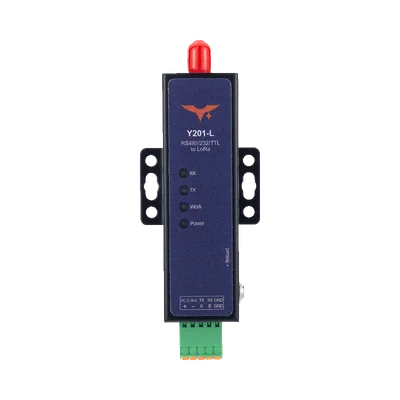

The PLC initiates a poll. The local DTU transmits the serial frame; the remote DTU delivers it to the instrument. The reply returns through the same path. Measurement registers remain in the instrument, and the polling logic remains in the PLC.
For this example, order the RS485 variant and use transparent serial mode. Y201-L has one physical serial port, supplied as RS485, RS232 or 3.3 V TTL depending on the variant. Match each port to its connected equipment, match the radio settings across the pair, and allow for packetization and radio delays in the host's response timeout. The serial baud rate is not the wireless throughput.
2. Transfer a field signal to a remote output
If a switch at one location needs to operate an indicator at another, there may be no serial message to forward. Wireless I/O instead senses an input and reproduces its state at a corresponding output. A Y401-11-L pair illustrates this with a digital input (DI) and relay digital output (DO) on each device.
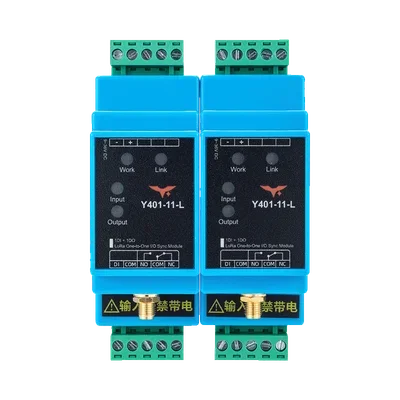

Here, the field contact provides the input state and the receiver changes its relay state. The basic link needs no PLC program, SIM card, Internet connection or LoRaWAN gateway. Digital inputs on these models accept passive dry contacts or NPN open-collector signals; do not apply voltage directly to DI.
What changes when the contact closes?
During normal communication, closing the sending unit's DI contact energizes the paired unit's relay, connecting NO to COM. Opening the input resets the relay and opens NO–COM. The indicator still needs its own suitable power circuit.

Wireless I/O also includes model-specific analog links. An analog pair carries a measurement signal to a compatible analog output; it is a different interface from digital contact-to-relay transfer. Use the Wireless I/O family comparison to check signal type and the exact model specification.
3. Send device data through a LoRaWAN network
A LoRaWAN deployment separates field devices, radio gateways and network services. A gateway receives radio packets and forwards them over an IP connection to a Network Server. The application then decodes and uses the device data.

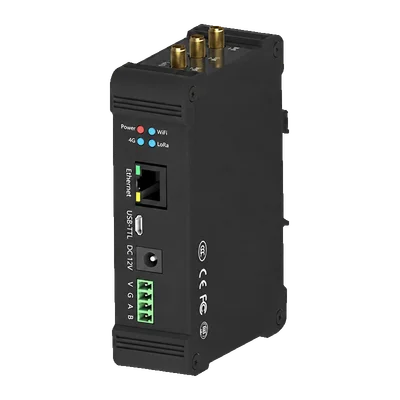
For local payload processing and industrial integration, Y511-L supports application services and Modbus mapping with compatible local-service software.
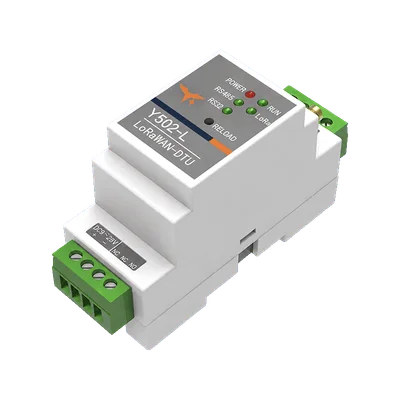
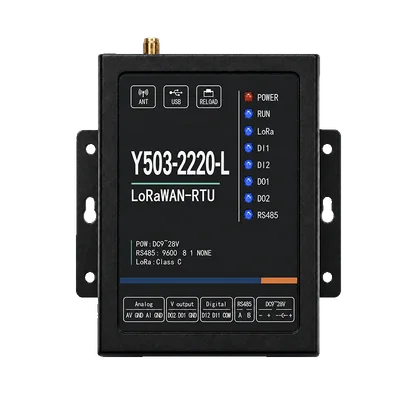
The two voltage outputs on the RTU are not dry relay contacts: their ON voltage follows the RTU supply. This matters when connecting a load. Likewise, an application MQTT broker does not replace the Network Server that manages LoRaWAN device sessions and downlinks.
LoRaWAN does not require a public network or a cloud application. It can use local services, provided the selected hardware and software support them. See What Is LoRaWAN? for device classes, joining, security and the full message path.
How do Y401, Y402 and Y403 topologies differ?
Within private LoRa Wireless I/O, the control relationship matters as much as the number of terminals. These three families define different relationships; they are not interchangeable ways to add more independently controlled outputs.
Y401: a point-to-point pair
Two fixed locations exchange corresponding signals. In a digital pair, an input on one unit drives its matching relay output on the other. Bidirectional operation lets both locations send input states. Select the channel count and signal type for the task.

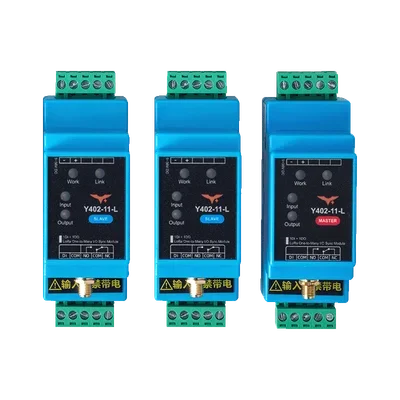
Y402: one master and multiple slaves
With Y402-11-L, closing the master's input energizes all slave outputs during normal communication. Any closed slave input energizes the master's output, which resets only when every slave input is open. The slave inputs share one master output rather than providing separate status channels for each location.

Y403: linked nodes with signal forwarding
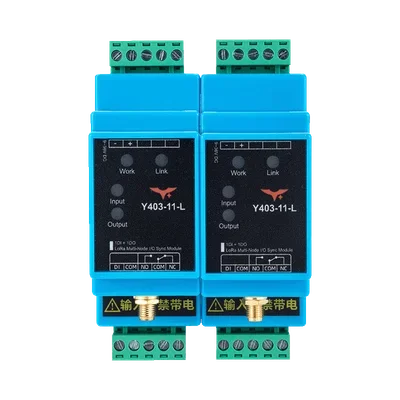
With Y403-11-L, any linked node's input can energize the linked relay outputs. During normal communication, all linked inputs must return to open for the outputs to reset. Auto Relay forwarding can extend the communication path; it does not provide arbitrary independent control of every output.

One active input holds the linked output group on
In the first state below, only Node A's input is closed, but every linked relay output is energized. In the second state, all three inputs are open and the outputs reset. If another input remains closed, opening Node A alone does not clear the group.

A water-tank example: what needs to cross the radio?
Consider a water tank monitored from a distant control room. The connection depends on what the control room needs to read or control.
- “Read the existing instrument.” The tank has an RS485 level instrument and the PLC already polls its registers. A serial radio pair can carry that conversation. Check successful replies and timeouts at the required polling interval.
- “Show when the tank is full.” A float switch provides a contact state. A digital Wireless I/O pair can reproduce that state at a remote indicator. It does not turn a single threshold contact into a continuous level measurement.
- “Record levels from several tanks.” LoRaWAN field devices can send readings through a gateway to an application. For a 4–20 mA level transmitter, verify the RTU's current-input wiring, scaling, reporting interval and application payload decoding.
Follow one level reading from the tank to the application
A compatible 4–20 mA level transmitter feeds the RTU's fixed current input, AI. The RTU reports the measurement in a LoRaWAN payload. After network processing, the application decoder interprets the firmware's encoding and applies the transmitter's current-to-level scale.

Receiving a value and using it correctly are separate checks. A raw current reading needs the transmitter's range to become a level; a previously received “full” bit needs a freshness check before it describes the tank now. Neither a radio link nor a dashboard provides an independent overfill protection system.
Which communication path should you choose?
| Question | Serial LoRa link | Private LoRa Wireless I/O | LoRaWAN |
|---|---|---|---|
| What crosses the link? | Serial frames | Input states or model-specific analog values | Application data in LoRaWAN messages |
| Where does it arrive? | Another serial port | A corresponding output | Network and application services |
| Who defines the action? | The connected host and equipment | The model's signal-mapping rules | Device firmware and application logic |
| Gateway and Network Server? | Not for the illustrated direct link | Not for the basic I/O link | Required roles; deployment may be local |
| Important setup checks | Serial format, radio settings, packetization and host timeout | Pairing, topology, signal type and output fault behavior | Regional plan, activation, payload mapping and downlink behavior |
Begin with a serial link when you want to retain an existing equipment protocol. Begin with Wireless I/O when the task is direct signal transfer. Consider LoRaWAN when the task includes managing distributed devices and delivering their data to an application. Then check the exact hardware and timing requirements; none of these labels establishes a guaranteed command-response time.
What should you check before deployment?
- Region and hardware. Y201-L's documented radio band is 410–493 MHz; it is not an EU868 or US915 device. For LoRaWAN, match the end device, gateway and server's regional plan and channel settings. Use the frequency-band guide for the distinctions, then confirm local requirements.
- Signal and load. Check RS485 versus RS232, passive contact versus voltage input, analog range, and relay contact versus switched voltage output. Verify the exact wiring and load rating before connecting equipment.
- Radio path. Survey obstacles, antenna placement and interference. An open-area distance in a specification is a planning value, not an installation guarantee.
- Traffic and timing. Test the intended payload, reporting or polling interval, retries and response timeout. LoRaWAN Class A downlinks follow an uplink; powered Class C devices listen almost continuously, but still depend on network scheduling and radio capacity.
- Power and integration. Low-power radio technology does not make every finished industrial product battery-operated. Budget the device, sensors and loads, and confirm which local server or protocol-conversion functions require software options.
- Interruption and recovery. Test stale readings, output behavior on link loss and what happens after reconnection. The Wireless I/O loss-and-recovery guide explains why a communication timeout and equipment protection are different functions.
For the tank example, a useful first bench check follows one complete transaction: initiate a PLC poll, operate the float switch, or send a known sensor reading. Verify the result at the receiving port, output or application, then interrupt the link and observe how the receiving system reports the loss.